

Contact Us
Index
Version 23.4
Version 6.0 Version 5.14 Version 5.13 Version 5.12 Version 5.11 Version 6.1 Version 6.2 Version 6.3 Version 6.4 Version 20.1 Version 20.2 Version 20.3 Version 21.2 Version 22.1 Version 22.3 Version 22.4 Version 23.1 Version 23.2 Version 23.3 Version 24.1 Version 24.2 Version 24.3 Version 24.4 Version 25.2 Version 25.3 Version 25.4
Contact Us
Wands for Oracle 23.4 – Home
Wands
Logging On
Antivirus Software
New Release Notification
User Profile
Responsibility Selection
Excel Not Ready Error
Add-In Load Error
Multiple Instances
License Key
License Key Errors
Insert Wands Function
Combine Text
Last Refreshed By
Last Refreshed Time
Split Text
Tools (Wands)
Snapshot
Upgrade Workbook
Shared Templates Drive
Drive Types
File Server
Oracle E-Business Suite Database
Navigator
Create a File
Delete a File
Edit a File
Open a File
Common Options
Administrator
Custom Drill Columns
Journal Custom Columns
Journal Attachment Custom Columns
Subledger Custom Columns
Subledger SLA Custom Columns
Add a Custom Drilldown Column
System Administrator Options
System Administrator License Key
System Administrator User Permissions
System Administrator User Options
System Administrator Product Options
Wands Responsibility Profile Option
System Administrator Delimiter Options
Payroll Drilldown Responsibility
System Administrator Configuration Options
Custom Options
System Administrator Server Information
Active Data Guard Support
Table Security
About
Exit
Errors and Troubleshooting
Help and Shortcuts
Excel Error
GL Wand
Ledger and Segment Selector
Quick Start
Report Wizard
Design Layout
Add Columns
Add Rows
Report Wizard Output
Discover
Discover Segment Values
Discover Level
Discover Period Names
Discover Segment Properties
Discover Child Ranges
Expand and Explode
Expand Segment Values
Expand Segment Value Hierarchy
Expand Account Combination
Explode Segment Values
Explode Account Combination
Explode Segment Value Hierarchy
List of Values
List of Values – Create
Insert GL Wand Function
Account Combination Enabled
Account Combination End Date
Account Combination Start Date
Account Type
Daily Rate
Enabled Flag
Functional Currency
Get Average Balance
Get Average Balance Summary
Get Balance
Descriptive Flexfield Criteria
Segment Combination Criteria
Get Balance Options
Get Balance Summary
Multiple Ledgers
Historical Rate
Ledger Name
Ledger Set
Next Segment Value
Parent Flag
Period Average Rate
Period End Date
Period End Rate
Period Name
Period Name By Date
Period Offset
Period Start Date
Period Status
Previous Segment Value
Segment Description
Segment DFF
Segment End Date
Segment Group
Segment Level
Segment Start Date
Calculating
Execute Drilldown
Drill Criteria Sheets
Drill Criteria – Balance
Drill Criteria – Journal Extract
Drill Criteria – Average Balance
Drill Using a Saved Template
Drill to Journal or Subledger
Analyze Balances
View Transaction R12
Support All Ledgers
Customize Drilldown
Edit Template Layout
Save Template Layout
Manage Templates
GL Wand Tools
Other Tools
Manage Criteria Templates
Hide Zeros
Import FSG
Configuration Sheet
Audit Get Balance
GL Wand User Options
GL Wand Drill Only
Budget Wand
Ledger Selector
Insert Budget Wand Function
Convert Get Balance
Load Budget
Load Option Selector
Loading Budgets
AutoPost Budget Wand Journals
Creating New Account Combinations
Budget Wand Tools
Budget Wand Requests
Budget Wand Messages
Budget Report Wizard
Budget Wand User Options
Reports Wand
Responsibility Selector
Report
Open Existing Report
Create Report
Execute Report
Function
Run Report Order
Insert a Run Report Function
Run Report Filter
Modify a Run Report Function
Drill On Function
Drill to Saved Template
Refresh
Refresh Mode
Refresh Reports Wand Functions
Show
Parameter List
Report Editor
Template Manager
Reports Wand Tools
Clean Template
Show List of Values
Create List of Values
Audit Run Report
Report Usage Statistics
Reports Wand User Options
Administration
Report Definition
Create
Bind Variables
Bind Variable Errors
Custom SQL List of Values
Filters
SQL Errors
Edit
Security
Multi Data Source (MDS)
Mass Administration
Import
Import All to Excel
Import Selected to Excel
Process
Process All
Process Single
Upgrade
Upgrade Version 4 Report Definitions
Fixing Duplicate Bind Variables
Upgrade Version 4 Templates
Upgrade Reports Wand Administrator Templates
insights
Generate Report Definitions
Create insights Tables
Search Report Definitions
Add Columns
Key Flexfield Label Integration
Advanced insights
Angles for Oracle
Import Angles for Oracle Report Definitions to Excel
Refresh Angles for Oracle Security Manager
Essays
Search Answers
Create Join Definition
Discoverer Converter
Convert using Discoverer Plus (.xml) Export
Export Workbook .xml From Discover Plus
Using the Discoverer Converter
Assign Reports
Refresh List
PL/SQL Stored Procedures
Reports Wand Database Package
Create a Stored Procedure
Assign a Stored Procedure
Exception Handling
Journal Wand
Loading Journals
AutoPost Journal Wand Journals
Journal Wand Ledger Selector
Create Journal Wand Template
Edit Journal Wand Template
Create Journal Wand Template from Drilldown
Populate Journal Wand Template
Account Combinations
Descriptive Flexfields
Journal Attachments
Load Options
Journal Wand Tools
Journal Wand Requests
Journal Wand Messages
Journal Wand User Options
Report Distribution Manager
Create RDM Template
Source Report
Named Ranges
Parameters
Drilldowns
Email
Advanced Options
Edit RDM Template
Execute Report Distribution Manager
Load and Validation
Execution
Scheduler
Create Schedule
Running the Scheduler
RDM User Options
SMTP Email Settings
chat icon - ignore
Live Chat
Chat Offline

Search Report Definitions

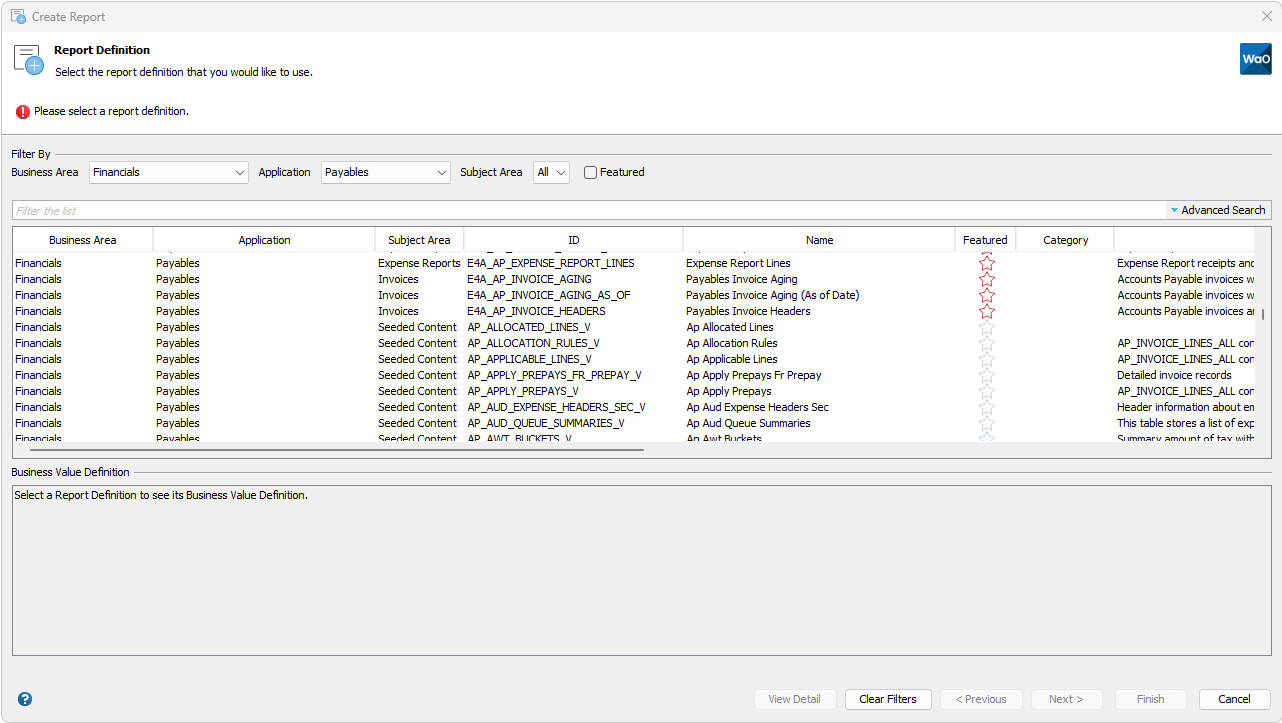
When Reports Wand insights is enabled, additional search functionality is available to assist in finding a report definition.  This search functionality is available in the following dialogs: Create Report, Run Report Function Wizard and Import Reports Wand Definitions.

Report definitions generated by insights also have additional fields populated, which are not available in custom-built definitions. They are: Business Area, Application, Subject Area, Featured, Tags and Business Value Definition. The Business Value Definition is only populated in a report definition generated from an insights Report Definition Package.

A Business Area, such as “Financials”, comprises a number of Applications (Oracle Modules), for example “Payables”, “Receivables” etc. Each Application comprises one or more Subject Areas, for example “Invoices” and “Payments”. A default Subject Area named “Seeded” exists for each Application, and is assigned to Insight report definitions generated from e-Business Suite views. This taxonomy does not apply to custom definitions and consequently their Business Area value is defaulted to “Custom”.

Certain insights report definitions are flagged as “Featured”. These are identified as having particular value.

Filter By Fields

Select values in the dropdown lists for Business Area, Application and Subject Area, and check or uncheck the Featured checkbox, to filter the report definitions accordingly.

In addition, enter text in the “Filter the list” field to display only those report definitions containing the text in any of the displayed fields.
Advanced Search

An advanced search feature is available for searching insights Report Definitions. Click the down-arrow to the right of the “Filter the list” text box to expose the advanced search pane. The advanced search fields are enabled when the Filter By Business Area is set to a value other than “Custom”.

Enter text in the Advanced Search field and select the fields (Column Label and/or Column Description) applicable to the search. This enables you to find all insights report sefinitions that match the search criteria.  For example, if you want to find all definitions that have columns containing the text “Invoice Date” in their column label, enter “Invoice Date” in the Advanced Search field and select the Column Label checkbox. After clicking the Apply button, the table is filtered to display report definitions matching the advanced search criteria, as well as any other Filter By criteria entered.

Clear Filters

Click the Clear Filters button to reset all search filters i.e. the Filter By and Advanced Search fields.

View Detail

The View Detail button is available in the Create Report and Run Report Function Wizard dialogs and is enabled when an Insight-generated report definition is selected. Click the button to display additional report definition information.