


Get Budget Control System Balance
Budget Control System function.
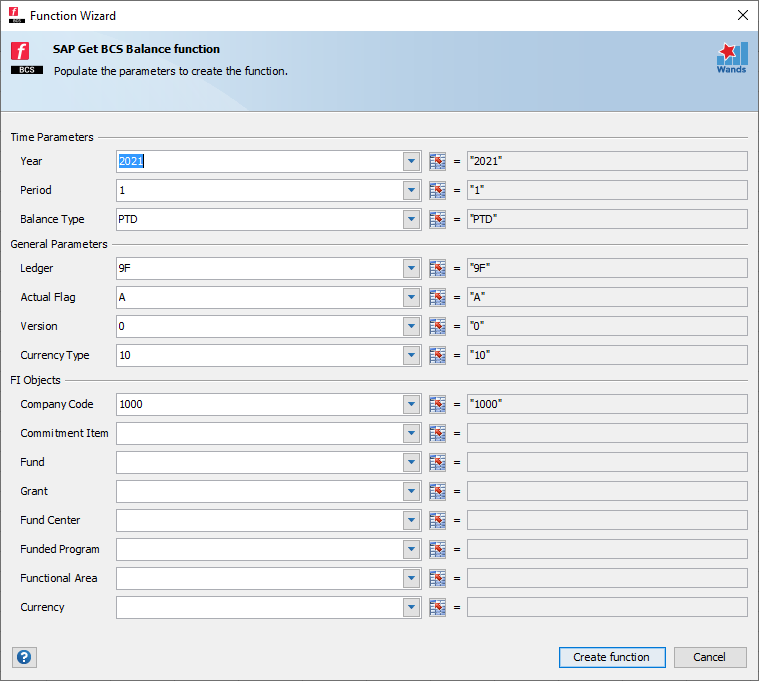
| Parameter | Description |
|---|---|
| Year | A value, e.g. “2017” |
| Period | Period number e.g. “1” |
| Balance Type | YTD – summarizes the full year balance up to the period parameter input
PTD – summarizes the movement for the period parameter input QTD – summarizes the movement for the quarter based on the period parameter input CTD – summarizes the custom period criteria based on the period parameter input e.g. “2:4” |
| Ledger | Ledger ID e.g. “00” |
| Actual Flag | A = Actual; B = Budget |
| Version | If you have selected Budget values, enter the applicable Version. The wizard will automatically insert the correct version for Actuals. |
| Currency Type | The Currency Type as configured in SAP e.g. “10” = Company Code Currency; “30” = Group Currency |
| Company Code | The Company Code(s); It is important to note that all company codes selected for a single formula must have the same currency code for the currency type selected, share the same chart of accounts, as well as all belong to the same controlling area. |
| Commitment Item | Optional |
| Fund | Optional |
| Grant | Optional |
| Fund Center | Optional |
| Funded Program | Optional |
| Functional Area | Optional |
| Currency | Optional, unless Document Currency is chosen as Currency Type |