



Insert Run Report Function
On the Function menu, click the Insert Run Report button. A list of the reports available to the responsibility is shown.

If there is another formula in the cell, or some other text, a warning will be displayed. This is to notify the user that the current cell contents will be overwritten. Select the desired report, and click Next. A screen will be shown with a number of options:

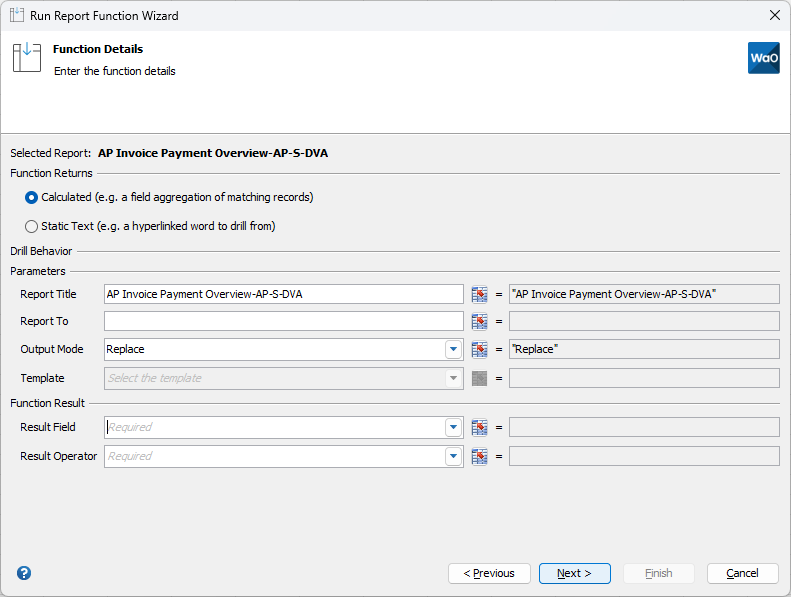
The information is divided into three sections.
Function Returns
The function return defines what will be displayed in the cell.
If you want to return a numeric value, such as a sum or count of a field, select the Numeric radio button. This value will be displayed in the cell once the function has resolved. If you just want to display some text that will describe the drilldown, select the Text radio button. The Text value (see below) will be displayed in the cell once the function has resolved.
Drill Behaviour
This section controls what happens when the user double click on the cell containing the function.
Report Title – this will be the title that is shown on the report if the user drills from the advanced function. This defaults to the report title that was entered when the report was created but can be changed.
Report To – if this is blank, the report will drill to a new workbook. If there is a matching drilldown template on the worksheet this field point to, then the output will be placed in that sheet.
Output Mode – This will almost always be Replace. Replace removes the values from the last run and replaces them with the results from the next run. Append will keep the results from the previous run and append the results from this run.
Function Result
The fields available in this section will depend on whether this is a Numeric or Text function, as defined in the Function Returns section above.
Result Field – this is the field that will be summed, counted, etc. The options available will depend on the field type, i.e. Date, Number, String, etc.
Result Operator – the operator to apply to the Result Field. The options are Sum, Average, Count, Maximum and Minimum. Sum and Average are only available for Number fields.
Text – the text to display in the cell.
Once the values have been entered, click the Next button.

Parameters
Parameters (ie. Bind Variables) are not supported for this release of Reports Wands and Angles Professional integration.
Filters
A user can enter up to ten filters. These will be applied in addition to the parameters defined above. Filters can be applied to any field, not just those displayed on the report.
Dynamic list of values is associated with each filter. After selecting a column as a filter, the value field will provide a list of values. Type a minimum of three characters for the relevant values available to appear.
Advanced Criteria
The Advanced Criteria section has multiple options.
| Option | Description |
|---|---|
| Advanced | This allows the Filters created above to be joined together in complex ways. If two filters are entered, and this field is left blank, then the two filters will be joined together with an AND in the SQL. For example, assume Filter 1 is “Creation Date Greater Than 01-Jan-2000”, and Filter 2 is “Creation Date Less Than 31-Dec-2000”. If the advanced value is blank, the SQL will be “Creation Date Greater Than 01-Jan-2000 AND Creation Date Less Than 31-Dec-2000”. To change these criteria, enter a value into the Advanced field with format 1 AND (2 OR 3). The numbers represent the Filter, and the rest of the field must be valid SQL syntax. Currently we only support AND, OR and brackets. Using the example above, if we enter 1 OR 2 in the advanced field, the SQL will become “Creation Date Greater Than 01-Jan-2000 OR Creation Date Less Than 31-Dec-2000”. |
| Limit | This numeric value limits the number of rows returned. |
| Order By | This field will override the default order by clause used when the report was defined. Optionally select to sort in ascending or descending order. |
Once all the information has been filled in, click finish to create the function.